Sunday, January 03, 2010

Jasscore pour iPhone

Ma première application iPhone, Jasscore (lien iTunes) est enfin disponible sur l'AppStore au prix de 1.10 CHF. C'est une ardoise virtuelle qui vous permet de compter vos points et ceux de votre adversaire au jass (chibre, mise, etc.)

Les features

  • En français et en allemand
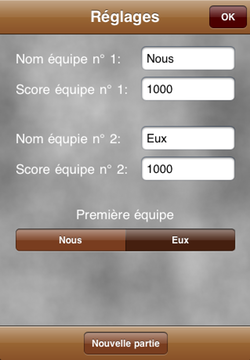
  • Editez le nom des équipes et les scores à atteindre
  • Notez les scores et les annonces
  • Multiplication des scores de 1x à 7x
  • Grand affichage afin que tous les joueurs puissent suivre les scores

Les captures d'écran


Score
Réglage
Grand Affichage

Je suis ouvert à vos suggestions, alors n'hésitez pas à laisser un commentaire ou à m'envoyer un e-mail.

Saturday, November 07, 2009

CLAlert: NSAlert done right

From NSAlert documentation:

Currently, there is no visual difference between informational and warning alerts.

This was written at the time of Panther and this is still true in Snow Leopard. So why the hell is the setAlertStyle: method provided?

NSCriticalAlertStyle
This style causes the icon to be badged with a caution icon.

A caution icon, for a critical alert? That does not make sense!

Here are screenshots of the default behaviours with the three different alert styles:


The documentation is unfortunately right: there is no difference between the informational and the warning style. The critical style is indeed badged with a caution icon.

As you probably have guessed from the title of this post, I am not happy with this behavior, so I have written a class, CLAlert (MIT License) that displays alerts the way I think it should be done. I.e. a note icon for an informational alert, a caution icon for a warning alert and a stop icon for a critical alert as you can see on these screenshots.


CLAlert is a drop-in replacement for NSAlert. It requires at lest Mac OS X 10.5.

Thursday, November 05, 2009

Watch a large number of icons with Preview.app

Browsing .icns files in Preview.app can be painful. If you try to open all the icons of the CoreTypes bundle for example with the following command

open /System/Library/CoreServices/CoreTypes.bundle/Contents/Resources/*icns

you will get this view:


All the different sizes of the .icns are displayed, which makes it quite unpleasant to browse.

F-Script Anywhere to the rescue!

Install F-Script Anywhere into Preview, then do

  1. FSA → New F-Script Workspace

  2. Click the Browser For Target… button

  3. Click on one of the icons

  4. Choose the PVIKImageBrowserView object

  5. In the F-Script Object Browser, name the PVIKImageBrowserView browserView


Finally, in the F-Script interpreter, paste the following code:
groups := browserView layoutManager groups.
count := groups count.
0 to:count-1 do: [:i | browserView collapseGroup:(groups objectAtIndex:i)]


Tada, a nice browsable view of your icons!

Wednesday, August 19, 2009

Booting from a dmg

I was pointed by Jean-Francois Roy that it is possible to boot off a dmg.

It's a simple two steps process using bootfolder:

./makebootfolder /Path/to/OperatingSystem.dmg
sudo ./blessbootfolder /Path/to/OperatingSystem.bootfolder

But beware: you better not have a space in the path to the dmg or in the dmg itself. If you happen to try this trick with a space in the path to the boot folder, then your Mac will brick. In verbose startup, you will get

Error loading kernel 'mach_kernel' (0x9)

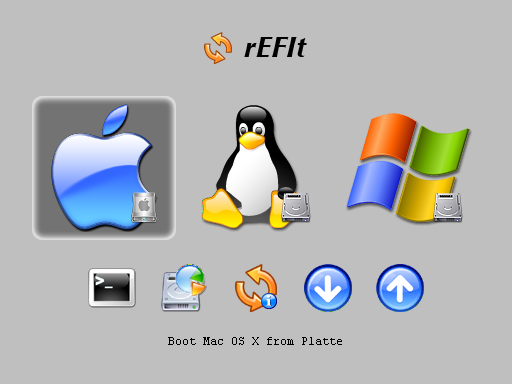
If you can't boot anymore, download rEFIt and burn it onto a CD. Then boot on the CD by pressing the C key. You should see something looking like this (maybe without the linux and windows partitions):


Just press enter and you should be able to boot your Mac.

Wednesday, April 08, 2009

Extract UIKit artwork

While writing an iPhone application (more about it on this blog soon), I wanted to tint my UIAlertView with the same color I tinted my other controls. Maybe this is not a good idea, but I wanted to try anyway. Unfortunately, only UISearchBar, UISegmentedControl, UINavigationBar and UIToolbar have the tintColor property. So I started digging into UIKit. The first place to look was obviously the -(void)[UIAlertView(Private) drawRect:] method. To draw its background, a UIAlertView calls _popupAlertBackground which in turn call _UIImageWithName(@"UIPopupAlertSheetBackground.png"). This file probably lies inside the UIKit.framework would think a Mac developer. In fact it is not there. Only two pngs are there: DefaultWallpaper-iPhone.png and DefaultWallpaper-iPod.png. So, where is it?

It is in fact somehow embedded in the Other.artwork file which contains UIKit artwork. This file is memory mapped at application startup, probably for performance reasons and the content is easily accessed with the private _UIImageWithName() function. _UIImageWithName looks up in a dictionary that associates a file name to some memory location that contains the actual image data.

Now, it would be cool to extract all this content to see what artwork UIKit contains. It turns out to be quite easy. The only trick is to find a reference to the dictionary containing all the file names. Check my UIKit Artwork Extractor project on github to see how it works.

In an attempt to encourage comments, I'm offering a beer at NSConference to the first person who will clearly explain how to find the magic address of the images dictionary (except for Nicolas who knows the answer already) and I'm offering two beers to the one who provides a cleaner way to obtain a reference to the dictionary that is not UIKit version specific ;-)

Edit: I have updated the code so that it is not UIKit version specific, so I won the beers myself that I'm going to drink right away.

Monday, March 23, 2009

chmod, ACL and symbolic links

Let's say you want to set an ACL on a symbolic link. So you try the -h option of chmod that is documented to change the mode of the link itself rather than the file that the link points to.

  $ ln -s aFileThatDoesNotExist myLink
$ /bin/chmod -h +a "everyone allow delete" myLink
chmod: Failed to set ACL on file 'myLink': No such file or directory

So, it seems myLink was followed even though we passed the -h option. Let's try with a link that points to an existing file:

  $ touch aFileThatExist
$ ln -fs aFileThatExist myLink
$ /bin/chmod -h +a "everyone allow delete" myLink
$ ls -le myLink aFileThatExist
-rw-r--r--+ 1 cluthi staff 0 5 mar 18:11 aFileThatExist
0: group:everyone allow delete
lrwxr-xr-x 1 cluthi staff 14 5 mar 18:12 myLink -> aFileThatExist

Our hypothesis is confirmed, the link was followed. Let's investigate and have a look at chmod source code (file_cmds-188 on darwinsource).

chmod.c:125 variable hflag is set to true if the -h argument is passed
chmod.c:388 function modify_file_acl() is called, the hflag is not passed to this function

Doh, lazy boys! Let's patch it and add a follow argument to the modify_file_acl() function:
int modify_file_acl(unsigned int optflags, const char *path, acl_t modifier, int position, int inheritance_level, int follow);
and call it with modify_file_acl(..., !hflag)

From acl_set(3) man: The acl_set_link_np() function acts on a symlink rather than its target, if the target of the path is a symlink. Perfect, that's what we need: we must call acl_set_link_np instead of acl_set_file in order not to follow the link.

chmod_acl.c:807 acl_set_file is called: (0 != acl_set_file(path, ACL_TYPE_EXTENDED, oacl))
Replace with (0 != (follow ? acl_set_file(path, ACL_TYPE_EXTENDED, oacl) : acl_set_link_np(path, ACL_TYPE_EXTENDED, oacl)))

With this small modifications, the -h option should be respected. Rebuild chmod and try again:

  $ ./chmod -h +a "everyone allow delete" myLink
chmod: Failed to set ACL on file 'myLink': Operation not supported
$ ln -fs aFileThatDoesNotExist myLink
$ ./chmod -h +a "everyone allow delete" myLink
chmod: Failed to set ACL on file 'myLink': Operation not supported

Now, whether the link points to an existing file or not, we get the Operation not supported error. That's better diagnostic, but not exactly what we expected :-( So, why is it not supported? Let's dig a bit more. acl_set_link_np implementation is found at Libc-498.1.5/posix1e/acl_file.c:175 and is:

  return(acl_set_file1(path, acl_type, acl, 0));

The last argument (follow) passed to acl_set_file1 is 0 and the first lines of acl_set_file1 implementation reads:

  if (follow == 0) {
/* XXX this requires some thought - can links have ACLs? */
errno = ENOTSUP;
return(-1);
}

We have the explanation of the Operation not supported error we got earlier. Note that the comment is not mine, it is actually in the libc source code!

Does it mean it is impossible to set an ACL on a symlink? Does it mean our only option is to file a bug asking some Apple engineer to think harder if links can have ACLs? Fortunately no. There is a third function in the acl_set(3) API: acl_set_fd, which acts on a file descriptor. Hopefully, getting the file descriptor of a symlink is as simple as open(path, O_SYMLINK).

That's it. With this patch, you'll be able to run ./chmod -h +a "everyone allow delete" myLink and have the ACL to be set on the symlink!

If you need to set ACLs on symlinks on a daily basis, I suggest you do not overwrite /bin/chmod but install the patched version of chmod in /usr/local/bin. Well, if you read that post till there, you probably know that already.

This bug has been reported to Apple and is known as radar #6264303 which is a duplicate of radar #5684438.

Sunday, January 04, 2009

Using your own address book in the iPhone Simulator

Jailbroken iPhone with openssh:

scp mobile@iPhone:~/Library/AddressBook/* ~/Library/Application\ Support/iPhone\ Simulator/User/Library/AddressBook

Non-jailbroken iPhone:

Say bye bye to John Appleseed & Co.

Wednesday, October 15, 2008

Kagi Registration Module (lack of) security

I'm in the process of choosing an eCommerce partner for selling my future shareware. I have narrowed down to eSellerate and Kagi as they are widely adopted by Mac shareware developers. After reading their respecting obfuscated pricing policies, I decided to have a look at what they offer for integrating the purchasing process into the application.

Kagi offers the Kagi Registration Module (KRM) which is basically a library that provides an in-application one click purchase experience. Sounds pretty good. I start reading the KRM developer documentation and stumble on the Security section:

The ZonicKRM submits orders through an SSL connection for security, however pricing information is currently passed from the application to the ZonicKRM as an XML string.

If this data is not checksummed, or otherwise protected, a malicious user may be able to edit the XML string within an application's executable and submit an order with an invalid price.

In the long term, this attack will be denied by moving the responsibility for pricing information from the KRM library to the KRM server. When this process is complete, vendors will be able to override the pricing information in shipping copies of an application using their Kagi database entry.


WHAT THE FUCK ? The user is able to choose the price he wants to pay ? Can't be true, this part of the documentation must be outdated. Guess what... it's not, long term is long term!

Note that checksumming or protecting is pure bullshit as long as the price comes from the application and not Kagi's server.

I searched for the first shareware using KRM I found, opened it with an hex editor, did search and replace of the string 30.00 to 01.00 and I indeed successfully ordered the shareware for $1.

This is totally irresponsible from Kagi. I don't know how this registration scheme could have been designed this way in the first place. No sensible person can design an ordering system where the price is set by the client.

Please don't flame me, I'm a good guy. I contacted the $30 shareware author and offered to pay the remaining $29 I owe him. I should have searched a bit longer for a cheaper shareware. $1 + $29 is a bit expensive to demonstrate that KRM sucks ;-)

The Bottom Line
Don't use KRM as long as you can't set the price of your shareware on Kagi's server.

Wednesday, September 03, 2008

QuietXcode

Have you ever noticed the Xcode(19838,0xb0103000) malloc: free_garbage: garbage ptr = 0x319a380, has non-zero refcount = 1 messages in the console ? Chris Espinosa replied about these warnings to Matt Neuburg:


The second one is an error deep in some system framework when running under Garbage Collection that we have not been able to track down yet. It simply means that somebody has neglected to do a final release on a memory block that nobody has kept a pointer to (making the final release technically impossible). The Garbage Collector knows the block is inaccessible and is freeing it, but is warning us that somebody forgot to formally release it before the pointer to it went out of scope. Bad form, but no actual harm.

I think it actually harms. These messages are filling the console so much it becomes unusable. I'm a big fan of GeekTool and I always have the tail of the console on the desktop. Now, it looks always the same and interesting messages from various applications are lost in the mass of free_garbage messages:

Xcode(19838,0xb0103000) malloc: free_garbage: garbage ptr = 0x319a380, has non-zero refcount = 1
Xcode(19838,0xb0103000) malloc: free_garbage: garbage ptr = 0x31bf6e0, has non-zero refcount = 1
Xcode(19838,0xb0103000) malloc: free_garbage: garbage ptr = 0x3263da0, has non-zero refcount = 1
Xcode(19838,0xb0103000) malloc: free_garbage: garbage ptr = 0x3274eb0, has non-zero refcount = 1
Xcode(19838,0xb0103000) malloc: free_garbage: garbage ptr = 0x319a380, has non-zero refcount = 1
Xcode(19838,0xb0103000) malloc: free_garbage: garbage ptr = 0x31bf6e0, has non-zero refcount = 1
Xcode(19838,0xb0103000) malloc: free_garbage: garbage ptr = 0x3263da0, has non-zero refcount = 1
Xcode(19838,0xb0103000) malloc: free_garbage: garbage ptr = 0x3274eb0, has non-zero refcount = 1
Xcode(19838,0xb0103000) malloc: free_garbage: garbage ptr = 0x201c8b0, has non-zero refcount = 1
Xcode(19838,0xb0103000) malloc: free_garbage: garbage ptr = 0x3256110, has non-zero refcount = 1
Xcode(19838,0xb0103000) malloc: free_garbage: garbage ptr = 0x201c8b0, has non-zero refcount = 1
Xcode(19838,0xb0103000) malloc: free_garbage: garbage ptr = 0x3256110, has non-zero refcount = 1
Xcode(19838,0xb0103000) malloc: free_garbage: garbage ptr = 0x2045540, has non-zero refcount = 1
Xcode(19838,0xb0103000) malloc: free_garbage: garbage ptr = 0x208ca10, has non-zero refcount = 1
Xcode(19838,0xb0103000) malloc: free_garbage: garbage ptr = 0x2045540, has non-zero refcount = 1
Xcode(19838,0xb0103000) malloc: free_garbage: garbage ptr = 0x208ca10, has non-zero refcount = 1

So I decided to tackle the problem and here is my Solution: QuietXcode 1.1.4 (5 KB). This is an Xcode plugin that patches the culpable call to malloc_printf("free_garbage: garbage ptr = %p, has non-zero refcount = %d", ...).

You can build the plugin either by typing xcodebuild in a terminal or by building it (⌘ + B) in Xcode. Building the plugin will also automatically install it into your ~/Library/Application Support/Developer/Shared/Xcode/Plug-ins folder.

Once it's installed, you have to relaunch Xcode. You should see the message <QuietXcode> loaded successfully in the console and no more free_garbage messages.

The plugin performs a safe patch, that is, if it does not find the expected call to malloc_printf and the expected Xcode version (greater than or equal to 3.1/1099), it logs a more or less comprehensive error to the console. Have fun browsing the source code, it demonstrates how to use the dyld and mach-o apis to locate non exported symbols and the mach api to dynamically patch code.

Note that the plugin is for i386 only, porting it to ppc and/or 64 bits is left as an exercise to the reader.

Friday, August 22, 2008

Exploring iPhone OS 2 files

Update: This technique also works with iPhone OS 3.x. You will find the VFDecrypt keys on The iPhone Wiki Firmware page. Just select the appropriate iPhone model and Version/Build of your firmware.

It turns out to be pretty simple:


  1. Download iPhone OS 2.0.2 (5C1)
    curl -O http://appldnld.apple.com.edgesuite.net/content.info.apple.com/iPhone/061-5241.20080818.t5Fv3/iPhone1,2_2.0.2_5C1_Restore.ipsw

  2. Unzip the ipsw which is actually a zip file
    unzip iPhone1,2_2.0.2_5C1_Restore.ipsw

  3. Download vfdecrypt
    svn co http://iphone-elite.googlecode.com/svn/trunk iphone-elite

  4. Compile vfdecrypt
    make -C iphone-elite/vfdecrypt_win32

  5. Decrypt the dmg (key from The iPhone Wiki)
    ./iphone-elite/vfdecrypt_win32/vfdecrypt -i 018-3978-1.dmg -k 31e3ff09ff046d5237187346ee893015354d2135e3f0f39480be63dd2a18444961c2da5d -o iPhoneOS-2.0.2.dmg

  6. Mount iPhone OS dmg and start exploring
    open iPhoneOS-2.0.2.dmg

Do not buy iQuarantine X

From iQuarantine X website:


  • iQuarantine X is not a background script or a script that gets attached to files or folders.
  • iQuarantine X is the first application to make the LEOPARD FILE QUARANTINE ALERTS go away.
  • iQuarantine X is the easiest way to rid LEOPARD of all FILE QUARANTINE ALERTS.

So, if it's not a script, what is it (beside a scam) ?
It's a hack that binary patches a system framework (/System/Library/Frameworks/CoreServices.framework/Versions/A/Frameworks/CarbonCore.framework/Versions/A/CarbonCore) by short-circuiting the private function _FSAllocateQuarantineData.

So we have four good reasons not to buy it:
  1. It has an unacceptable upgrade policy.
  2. It binary patches a system framework.
  3. Developer does not reply to e-mails.
  4. You can disable the Leopard quarantine for free with an official technique.

Thursday, July 10, 2008

The missing NSLocale documentation

+ (NSArray *)preferredLanguages
Return Value
The user's language preference order as an array of NSString objects, each of which is a canonicalized IETF BCP 47 language identifier. This is defined by the user in System Preferences → International → Language.

For your information: this is stored in the gloal domain in the AppleLanguages key.

+ (id)currentLocale
Return Value
The logical locale for the current user. The locale is formed from the settings for the current user’s chosen system locale overlaid with any custom settings the user has specified in System Preferences → International → Formats.
This method may return a retained cached object.


+ (id)autoupdatingCurrentLocale
This one I have not understood how it is supposed to be used. If someone knows, please let us know in the comments.

Now, if what you want is the current language, you should not use either of these methods. Instead you should use something like NSLocalizedString(@"ISOLanguageCode", @"iso language code"). Then you have to define "ISOLanguageCode" = "en"; etc. in all your Localizable.strings files.

Tuesday, June 10, 2008

Mac OS X bug on non english systems

Mac OS X 10.5 (Japanese): Disk Utility "internal error" alert with 7-pass erase or 35-pass erase

Symptoms
In the Japanese language version of Mac OS X 10.5, when performing a Secure Erase (7-pass or 35-pass erase) in Disk Utility, this alert may appear: "Disk Utility internal error. Disk Utility has lost its connection with Disk Management Tool."

Resolution
Change the Mac OS X language version to English before performing the secure erase.

I thought this kind of problem was Mac OS 9/Classic history.

Thursday, February 14, 2008

Upgrading a System Preference pane

The System Preferences application provides a convenient way to install a preference pane. Double-clicking the preference pane will prompt the user if he wants to install it for the current user only or for all users of the computer. Then System Preferences will copy the preference pane to ~/Library/PreferencePanes or /Library/PreferencePanes according to what was chosen asking for administrator password if necessary. Finally the preference pane will be loaded and presented to the user.

Now, let's see what happens when a preference pane is upgraded. Again, System Preferences is smart: it is able to detect if an older version of the same preference pane is installed and proposes to replace it [1]. Everything seems alright, but it is actually not! Things are more complicated if the preference pane to upgrade has already been loaded. That is, if the user already clicked the preference pane.

Indeed, preference panes are just a special kind of bundle which is loaded into System Preferences with the -(BOOL)[NSBundle load] method (cf. -(BOOL)[NSPrefPaneBundle instantiatePrefPaneObject] method of the PreferencePanes framework). The problem is that on Tiger, a NSBundle can not be unloaded. So when upgrading an opened preference pane, the old code is not unloaded and as a consequence the new code is not loaded. This is because System Preferences calls the -(BOOL)[NSBundle load] method which returns YES, meaning that the bundle was successfully loaded or that the code has already been loaded. In the case of an already opened preference pane, that's how the result of the load method should have been interpreted. Unfortunately, it is interpreted as if the bundle was successfully loaded and System Preferences thinks it has loaded the new bundle, but it has not.

This is very problematic because at this point, the resources (nib files, pictures etc.) of the new bundle have already been copied. So we have the old code which is accessing the new resources. I let you imagine the numerous problems this situation can cause. At best, exceptions will raise and your preference pane will be half working. At worst, your preference pane will simply crash.

So, how do we fix this problem?

First, the preference pane must detect itself when it's upgrading over an older already loaded version as System Preferences does not detect it [2]. This must be done as early as possible, i.e. at the very beginning of the - (id)initWithBundle:(NSBundle *) bundle method. It is possible to detect this situation with the help of the version of your NSPreferencePane subclass. See my detection snippet to understand how detection works.
Once this is detected, we must properly reload the new preference pane. This must be achieved by quitting System Preferences and relaunching System Preferences. This is the not that elegant solution to unload the old preference pane. The elegant solution would be to unload the bundle. This is left as an exercise to the Apple engineers for a future version of System Preferences.

Relaunching System Preferences and selecting the preference pane is quite tricky. A second executable must be responsible for relaunching the System Preferences application. Also, it is nicer for the user if the preference pane he just upgraded is automatically selected. Automatic selection of the pref pane is achieved through Apple Script. Please refer to my reload snippet for implementation details. Note that once you have compiled the reload executable, you have to place it inside the resources directory of your preference pane. Do not place it inside the executable directory (Contents/MacOS) if you do not want to see the reload application popping up in the Dock.

With this reload code in place, if the user ever happens to upgrade a preference pane while the older one was loaded, he will experience a System Preferences flicker as it will quit and reopen right away. While this might be surprising to him, this is still better than a half working preference pane or a crash.

If anything is unclear, just say it so in the comments and I will try to elaborate. If everything is clear, just pick up my code snippets and implement them in your preference pane as soon as possible ;-)


1. System Preferences uses the CFBundleGetVersionNumber function to retrieve the version numbers of the new and old bundles as an UInt32 in order to compare them. The documentation says If the bundle’s version number is a number, it is interpreted as the unsigned long integer format defined by the vers resource on Mac OS 9. What every developer understands is that if your Info.plist CFBundleVersion key represents a number (e.g. "519"), the value returned by CFBundleGetVersionNumber will be 519. This is not what actually happens. If you want CFBundleGetVersionNumber to return 519, you have to add an undocumented key in your Info.plist file: CFBundleNumericVersion. Make sure you define it as <integer>519</integer> and not <string>519</string>.

2. Note that on Leopard, this situation is actually detected and a dialog is presented to the user telling he must quit System Preferences and then open it again. Unfortunately, no automatic action is taken to circumvent this annoying behavior. System Preferences could restart itself or unload the bundle (this is possible since Leopard) but as of Mac OS X 10.5.2, none of this action is performed.

Friday, January 25, 2008

QuickTime 7.4 and Perian subtitles fix

With QuickTime 7.4, subtitles automatically added by Perian have stopped working. In order to get them back, download and install Front Row Trailers, go to the QuickTime Components tab, and install Perian 1.0.0.2. If the proposed version is below 1.0.0.2, hold the alt (option) key while clicking the Refresh button.

For thoses wondering, this is an unofficial build of Perian 1.0 onto which two patches have been applied. Note that the future Perian 1.1 release will also be able to read subtitles.

Enjoy, QuickTime 7.4 can read subtitles again, no need to downgrade to version 7.3.

UPDATE: Perian 1.1 is now released and has addressed the problem. Note that subtitles still do not work in Front Row on Leopard.

keywords: QuickTime 7.4 Perian subtitles srt

Thursday, November 29, 2007

BetterAuthorizationSample

Finally, Apple posted BetterAuthorizationSample, a sample project that demonstrates how to securely use Mac OS X authorization API.

Apple's older sample code (AuthSample and MoreAuthSample) used a setuid root privileged helper tool. BAS uses launchd because it's more secure. In the BAS design, an attacker can't directly control the environment which the helper tool inherits, and that prevents a variety of potential attacks.

This sample code supersedes the four years old Project Builder MoreIsBetter/MoreSecurity sample code that warned: No matter what you do, the current AuthorizationExecuteWithPrivileges model allows for security violations [3093666]. It comes as a Xcode project that compiles without tweaking and with three documentation files that look quite complete: Design and Implementation Rationale, Performing Privileged Operations With BetterAuthorizationSampleLib and Read Me About BetterAuthorizationSample.

Monday, November 19, 2007

Front Row for Tiger

Leopard users have the Front Row application in their Applications folder. It may be useful if you want to automatically launch front Row when your computer starts up by adding a login item for example.

Now, Tiger users can also use this convenient Front Row application. Leopard users who have accidentally deleted their Front Row application can also use it.

Front Row


I have not tested it on unsupported Macs, i.e. those without an Apple Remote. If you have such a Mac, please report in the comments if it works or if it still requires Front Row Enabler.

This Front Row launcher has been written from scratch. Here is the source code:

int main(int argc, char *argv[])
{
    BSRemoteUIToggle();
    return 0;
}

Wednesday, September 12, 2007

Region X Universal Binary

Thanks to ben11, a member of the rpc1 forums, new RPC-1 firmware updates are available for Matshita drives. This is great, but something was missing: an universal binary version of Region X. An intel only version is available, but it's english only and well, an universal binary version is just better. Unfortunately, xvi — the author of Region X — retired several years ago. Fortunately, he made Region X sources publicly available. So I recompiled it as an universal binary and I updated the version number to 1.1.3. Feedback is welcome.

Region X


Version history (version 1.0.0 to 1.1.2 are actually from xvi)

Version 1.1.3 (2007-09-12)
* Recompiled as universal binary
Version 1.1.2 (2005-01-12)
* Corrected a case where settings were not properly stored
Version 1.1.1 (2004-05-09)
* Added RPC-1 drive warning
* Region not set and 5 changes left logic tuned
Version 1.1.0 (2004-04-25)
* Japanese localization added, by Satoshi Ash
* Chinese localization added, by 季娇
Version 1.0.9 (2004-03-21)
* Changes to the settings read/write system
* New icon
Version 1.0.8 (2004-02-07)
* Spanish localization added, by 宗次郎
Version 1.0.7 (2004-01-25)
* Greek localization added, by Alexandros Tr
* Drag and drop installation
Version 1.0.6 (2003-12-29)
* Enhanced current settings reading, now compatible with OS X on UFS partition
* Window position is now remembered across launches
Version 1.0.5 (2002-10-16)
* Added Region not set case handling
Version 1.0.4 (2002-06-25)
* For Mac OS X 10.1.5
Version 1.0.3 (2002-02-27)
* Added German localization (translation by Ralph and David)
* Added safety check for privileged attribute
Version 1.0.2 (2001-11-26)
* Changed handling of five changes left logic to be more user friendly
* Added Dutch localization (translation by iRob)
* Added Italian localization (translation by Michele)
* For DVD Player 3.0.1
Version 1.0.1 (2001-11-11)
* Improved region settings validity check
* Enhanced documentation now in Help menu
* Added my photo (that incredible feature was requested by my wife)
* Multilingual version, english and french
Version 1.0.0 (2001-10-18)
* First release for OS X, english only
* Full native Cocoa application

Wednesday, May 23, 2007

Looking for a german translator for Bandes-annonces Front Row

The upcoming version of Bandes-annonces Front Row will be international. For those who don't know, Bandes-annonces Front Row enables you to change the trailers you watch inside Front Row. In the previous version, trailers came from AlloCiné, a french cinema site. In the upcoming version, the user will have several choices. I'm looking for a german translator as one of the source provides german trailers.

So if you are interested in watching german trailers inside Front Row and if you would like to spend a few minutes to translate Bandes-annonces Front Row, please post a comment.

Here are some screenshots so that you have an idea of what it looks like.

Saturday, May 19, 2007

L'effet MacBidouille

Le 7 mai, MacBidouille a parlé de Bandes-annonces Front Row dans ses news. Résultat: une augmentation de la fréquentation aussi spectaculaire que soudaine.
Mon hébergeur n'a d'aillers pas tenu le coup et certains ont eu des soucis pour télécharger Bandes-annonces Front Row. Je trouverai mieux pour la prochaine version, même si la fréquentation ne sera certainement pas aussi grande.