Wednesday, September 12, 2007

Region X Universal Binary

Thanks to ben11, a member of the rpc1 forums, new RPC-1 firmware updates are available for Matshita drives. This is great, but something was missing: an universal binary version of Region X. An intel only version is available, but it's english only and well, an universal binary version is just better. Unfortunately, xvi — the author of Region X — retired several years ago. Fortunately, he made Region X sources publicly available. So I recompiled it as an universal binary and I updated the version number to 1.1.3. Feedback is welcome.

Region X


Version history (version 1.0.0 to 1.1.2 are actually from xvi)

Version 1.1.3 (2007-09-12)
* Recompiled as universal binary
Version 1.1.2 (2005-01-12)
* Corrected a case where settings were not properly stored
Version 1.1.1 (2004-05-09)
* Added RPC-1 drive warning
* Region not set and 5 changes left logic tuned
Version 1.1.0 (2004-04-25)
* Japanese localization added, by Satoshi Ash
* Chinese localization added, by 季娇
Version 1.0.9 (2004-03-21)
* Changes to the settings read/write system
* New icon
Version 1.0.8 (2004-02-07)
* Spanish localization added, by 宗次郎
Version 1.0.7 (2004-01-25)
* Greek localization added, by Alexandros Tr
* Drag and drop installation
Version 1.0.6 (2003-12-29)
* Enhanced current settings reading, now compatible with OS X on UFS partition
* Window position is now remembered across launches
Version 1.0.5 (2002-10-16)
* Added Region not set case handling
Version 1.0.4 (2002-06-25)
* For Mac OS X 10.1.5
Version 1.0.3 (2002-02-27)
* Added German localization (translation by Ralph and David)
* Added safety check for privileged attribute
Version 1.0.2 (2001-11-26)
* Changed handling of five changes left logic to be more user friendly
* Added Dutch localization (translation by iRob)
* Added Italian localization (translation by Michele)
* For DVD Player 3.0.1
Version 1.0.1 (2001-11-11)
* Improved region settings validity check
* Enhanced documentation now in Help menu
* Added my photo (that incredible feature was requested by my wife)
* Multilingual version, english and french
Version 1.0.0 (2001-10-18)
* First release for OS X, english only
* Full native Cocoa application

Wednesday, May 23, 2007

Looking for a german translator for Bandes-annonces Front Row

The upcoming version of Bandes-annonces Front Row will be international. For those who don't know, Bandes-annonces Front Row enables you to change the trailers you watch inside Front Row. In the previous version, trailers came from AlloCiné, a french cinema site. In the upcoming version, the user will have several choices. I'm looking for a german translator as one of the source provides german trailers.

So if you are interested in watching german trailers inside Front Row and if you would like to spend a few minutes to translate Bandes-annonces Front Row, please post a comment.

Here are some screenshots so that you have an idea of what it looks like.

Saturday, May 19, 2007

L'effet MacBidouille

Le 7 mai, MacBidouille a parlé de Bandes-annonces Front Row dans ses news. Résultat: une augmentation de la fréquentation aussi spectaculaire que soudaine.
Mon hébergeur n'a d'aillers pas tenu le coup et certains ont eu des soucis pour télécharger Bandes-annonces Front Row. Je trouverai mieux pour la prochaine version, même si la fréquentation ne sera certainement pas aussi grande.

Monday, February 19, 2007

Front Row Trailers

English version below

Front Row Trailers est le nouveau nom de Bandes-annonces Front Row depuis la version 2.1.

Front Row Trailers n'est plus disponible. Veuillez vous référer aux instructions pour restaurer les bandes-annonces originale d'Apple.

Foire Aux Questions

Q: Comment faire pour désinstaller Front Row Trailers ?
R: Il n'y a pas besoin de désinstaller Front Row Trailers, il suffit de sélectionner la source Apple (US) et les bandes-annonces d'origine seront de retour.

Q: Est-ce que Front Row Trailers est compatible avec Leopard (Mac OS X 10.5) ?
R: Oui

Q: Sur Leopard, je dois entrer mon mot de passe à chaque fois que je change de source, que puis-je faire pour éviter cela ?
R: Il suffit de taper la commande suivante dans le Terminal (une fois la commande entrée, il faut taper son mon de passe):
sudo chmod o+w /System/Library/PrivateFrameworks/BackRow.framework/Versions/A/Resources/Trailers.plist

Q: Est-il possible de désactiver les bandes-annonces ?
R: Depuis la version 2.1.1, Front Row Trailers le permet en choisissant la source spéciale Deny.
Sur Leopard, il est aussi possible de désactiver les menus iTunes Top Movies, iTunes Top Songs et iTunes Top Music Videos en entrant la commande suivante dans le Terminal:
defaults write com.apple.frontrow EnableITMS -bool NO
Attention: cette commande doit être entrée avant de choisir la source Deny dans Front Row Trailers.

Q: Sur Leopard, certaines bandes-annonces ne se lisent pas aussi bien que sur Tiger ou ne fonctionnent même pas du tout. Prévoyez-vous de distribuer une mise à jour ?
R: Front Row pour Leopard utilise une architecture très différente de celle de Front Row pour Tiger. Tandis que Front Row pour Tiger utilise QuickTime pour lire les bandes-annonces, Front Row pour Leopard semble utiliser son propre méchanisme passant outre QuickTime. Alors que les bandes-annonces se lisent bien dans QuickTime player, celles-ci peuvent ne pas fonctionner dans Front Row. C'est notamment le cas avec les bandes-annonces allemandes utilisant le codec Sorenson 3. Malheureusement, il n'y a rien que je puisse faire. Néanmoins, une future mise à jour de Front Row ou de QuickTime pourrait résoudre ces problèmes.

Historique des versions

Version 2.1.2 (2008-01-24)
* Ajouté Ciné.ch (source suisse romande)
* Détection correcte de la version de QuickTime
Version 2.1.1 (2007-12-18)
* Ajouté Lycos (source espagnole)
* Enlevé Cinefacts (l'accès à Front Row Trailers a été bloqué)
* Possibilité d'interdire les bandes-annonces
Version 2.1 (2007-10-15)
* Changement de nom
* Bandes-annonces haute définition
* 20 sources
* Traduction italienne
* Traduction danoise
* Options de tri
* Nouveau système de mise à jour
Version 2.0.2 (2007-08-20)
* Corrige un bogue dans la détection de Perian
Version 2.0.1 (2007-06-22)
* Corrige un bogue dans la détection des composants QuickTime
Version 2.0 (2007-06-21)
* Nouvelle interface
* 9 nouvelles sources de bandes-annonces à choix
Version 1.1 (2007-05-03)
* Suppresion des saccades
Version 1.0 (2007-02-19)
* Version initiale


Bandes-annonces Front Row is know as Front Row Trailers since version 2.1.

Front Row Trailers isn't available anymore. Please refer to instructions to restore factory Apple trailers.

Frequently Asked Questions

Q: How do I uninstall Front Row Trailers ?
A: There is no need to uninstall Front Row Trailers, just select the Apple (US) source and you will get the original trailers from Apple.

Q: Is Front Row Trailers compatible with Leopard (Mac OS X 10.5) ?
A: Yes

Q: In Leopard, I am prompted for my password every time I change the source, is there anything I can do about that ?
A: Just type the following command in the Terminal (you will have to type your password):
sudo chmod o+w /System/Library/PrivateFrameworks/BackRow.framework/Versions/A/Resources/Trailers.plist

Q: Is it possible to disable the theatrical trailers ?
A: Since version 2.1.1, Front Row Trailers is able to deny trailers access by choosing the special Deny source.
On Leopard, it is also possible to disable the iTunes Top Movies, iTunes Top Songs and iTunes Top Music Videos menus by typing the following command in the Terminal:
defaults write com.apple.frontrow EnableITMS -bool NO
Warning: this command must be typed before choosing the Deny source.

Q: In Leopard, some trailers won't play as smoothly as in Tiger or won't even play at all. Are you planing to release an update ?
A: Front Row for Leopard uses a very different architecture than Front Row for Tiger. Whereas Front Row for Tiger uses QuickTime for playing the trailers, Front Row for Leopard seems to uses its own mechanism ignoring QuickTime. While the trailers play fine in QuickTime Player, they may not play in Front Row. This is notably the case with german trailers using the Sorenson Video 3 codec. Unfortunately, I can not do anything about that. Nevertheless, a future update of Front Row or QuickTime may fix these issues.

Version history

Version 2.1.2 (2008-01-24)
* Added Ciné.ch (swiss french source)
* Correctly detects QuickTime version
Version 2.1.1 (2007-12-18)
* Added Lycos (spanish source)
* Removed Cinefacts (Front Row Trailers access has been blocked)
* Possibility to deny trailers access
Version 2.1 (2007-10-15)
* Name change
* High-definition trailers
* 20 sources
* Italian localization
* Danish localization
* Sorting options
* New update system
Version 2.0.2 (2007-08-20)
* Fixes a bug in Perian detection
Version 2.0.1 (2007-06-22)
* Fixes a bug in QuickTime components detection
Version 2.0 (2007-06-21)
* New interface
* 9 new trailers sources
Version 1.1 (2007-05-03)
* Trailers play more smoothly
Version 1.0 (2007-02-19)
* First version

Monday, December 04, 2006

Network Diagnostics cannot find server


I doubt I typed the address incorrectly. :-)

Monday, November 06, 2006

zip vs dmg

Most Cocoa developers use disk images (aka dmg) for distributing their softwares over the Internet. This is not really surprising as this is Apple's recommended practice for software distribution.

My gripe against this practice is simple: it's very slow. I did an experiment that I think is rather representative. I bundled a 1.9 MB application (Transmission) into both a zip file and a dmg file. I'm talking here about internet-enabled disk images, i.e. those which copy their content, unmount and go to trash automatically.

Here are the results of my experiment.

SizeTime
zip0.7 MB0.16 sec
dmg1.3 MB9.02 sec

Impressing, isn't it ? The size is almost twice bigger for the dmg although I used maximum compression (zlib level 9). That's bad (not all Mac users have a broadband connection) but what is worse is the time to prepare the disk image, verify the disk image, mount the disk image, clean up, check the download files, prepare the disk image, mount the disk image, copy the disk image, unmount the disk image and clean up. Yes, these are the ten operations required for an internet-enabled disk image to achieve the decompression! Zip decompression requires only two phases: decompressing the zip file and checking the downloaded files, thus it is 56 times faster.
Results may vary depending on application size and may be slightly different for a ten MB application but I can't see how a disk image could be either smaller or faster to decompress than a zip archive. If you know such an exemple, please post a comment about it.

Since Mac OS X 10.3, zip file compression and decompression is natively supported. Prior to Mac OS X 10.3, StuffIt Expander was bundled with Mac OS X. A convenient Create archive of "..." stands in the File menu of the Finder. It's simple and efficient, so why not using it ?

Some may argue that disk images are nice for drag & dropping the software into the Applications folder. While this is true, this is also very slow. When using a non internet-enabled disk image, users have to copy the application into the Applications folder which takes much more time than moving it. Moreover, they have to go to the desktop in order to unmount the disk image.

You have understood by now, I hate disk images and I hope more and more developers will use zip files in the future to distribute their softwares in order to save their users' precious time. ;-)

Finally, I suggest you have a look at these movies (no faking) showing how fast and how long it takes to decompress respectively a zip file and a dmg file.


Saturday, October 21, 2006

Jasscore

Marquez les points au jass sur votre natel

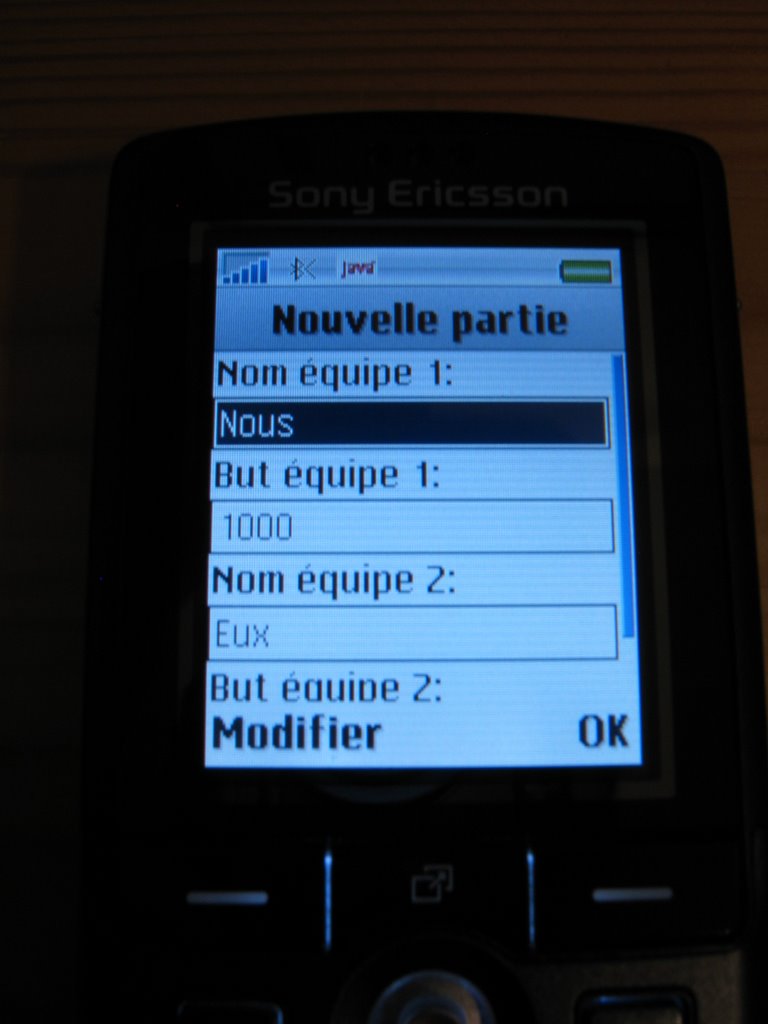
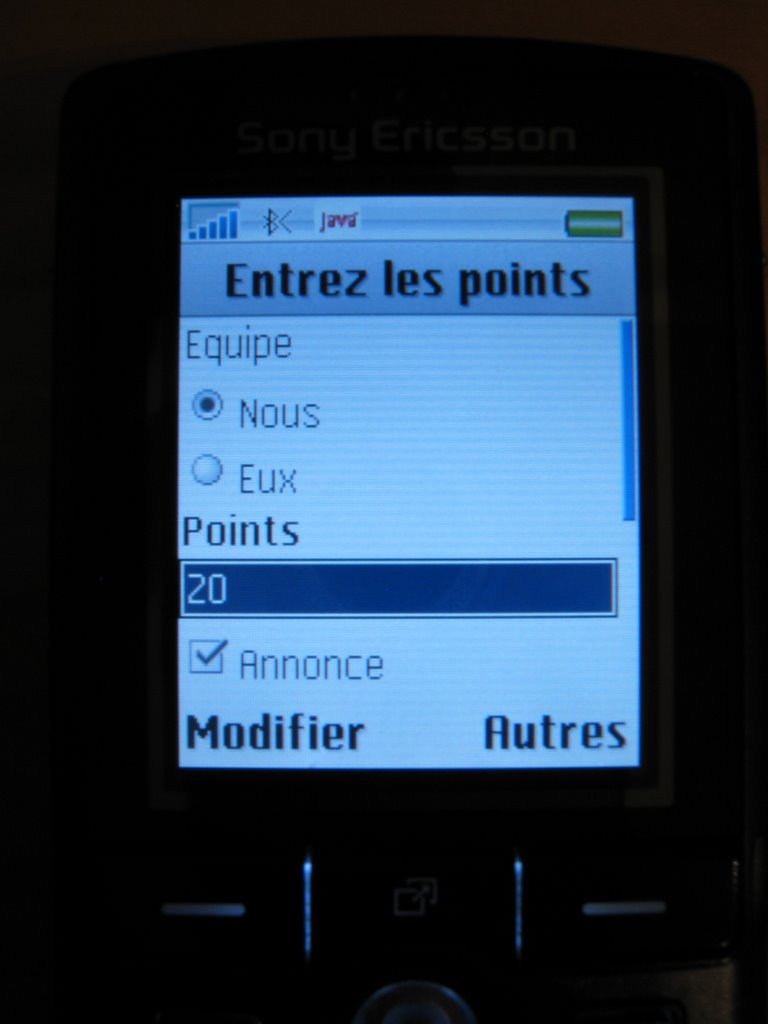
Vous êtes accros aux cartes et à votre natel ? Alors je suis sûr que vous adopterez Jasscore. Avec ce midlet, vous pourrez tenir les scores d'une partie de jass (chibre, mise, etc.) encore plus facilement qu'avec une ardoise.

Je vous laisse juger par ces quelques captures d'écran.


Aucune documentation n'a été écrite car Jasscore devrait être assez intuitif. Si toutefois vous avez des questions, n'hésitez pas à laisser un commentaire ou bien à m'envoyer un message.

Téléchargement:
ZJasscore 1.0 (6 Ko)

Installation:
Référez-vous à la documentation de votre natel. Si celui-ci supporte le bluetooth, il vous suffit d'envoyer le fichier Jasscore.jar et il devrait s'installer automatiquement.

Wednesday, October 04, 2006

Replacement icon for Mail.app


I personally dislike the default Mail.app icon. Instead I chose to use the yellow mailbox from cocoricones. It looks really nice and is not blue as almost all other Apple icons!
You can also download it in .icns format ready to replace Mail.app icon.

keywords: Mail.app, icon, yellow, mailbox

Tuesday, October 03, 2006

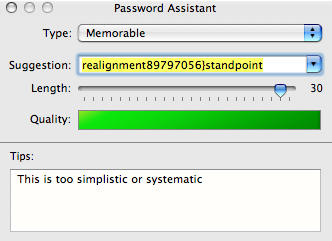
This is too simplistic or systematic


Indeed: way too simplistic! I should construct my password myself rather than relying on the Password Assistant :-)

Sunday, September 24, 2006

Xcode and subversion 1.4 fix

I was unsatisfied to have to revert back to subversion 1.3.2 because Xcode (v2.4) does not yet support the new format of subversion 1.4 .svn/entries file (see my previous blog entry: Xcode and subversion 1.4 incompatibility).

So I wrote a SIMBL plugin that adresses this problem.


  1. Download and install SIMBL (Smart InputManager Bundle Loader) if not already installed

  2. Download Xcode+svn-1.4 and decompress it

  3. Move Xcode+svn-1.4.bundle into ~/Library/Application Support/SIMBL/Plugins

  4. Relaunch Xcode, it is now compatible with svn 1.4 :-)

  5. Update: Xcode 2.4.1 addresses this problem so my plugin is not needed anymore.
keywords: Xcode, SCM, subversion, svn, 1.4

Digg!

Thursday, September 21, 2006

Xcode and subversion 1.4 incompatibility

Xcode will unfortunately not work with the latest version of subversion, i.e. version 1.4. The reason behind this dysfunctionment is the new format of the .svn/entries files (see subversion 1.4 release notes). The new format is no more friendly xml. Xcode thus does not find the url=... node and fails with this rather sparse warning: NSScanner: nil string argument.

The solution to this problem is to revert to subversion 1.3.2 until Apple fixes the subversion plugin for Xcode, maybe in the next version.

keywords: Xcode, crash, subversion, svn, 1.4

Sunday, July 09, 2006

Dealing with outdated open source libs in Mac OS X

Mac OS X system frameworks heavily rely on open source libraries. For example, the NSXML classes of the Foundation framework are wrappers around libxml2. The problem is that libxml2 bundled into Mac OS X (10.4.7 as of writing) is version 2.6.16, dating back from november 2004! Current version is 2.6.26 and obviously has fixed a lot of bugs since version 2.6.16.

A specific bug I discovered was rather annoying: NSXMLDocument's validateAndReturnError: method would validate an invalid document. You guessed it, an up-to-date version of libxml2 doesn't suffer from this bug. So the solution to the problem would be to compile the latest version of libxml2 yourself and use this one for your application instead of the system version. This sounds easy but is in fact far from being trivial.

Compiling an universal binary version of libxml2 is easy, this is achieved with the following commands:
$ env CFLAGS="-arch i386 -arch ppc" LDFLAGS="-Wl,-syslibroot,/Developer/SDKs/MacOSX10.4u.sdk" ./configure --disable-dependency-tracking --enable-static=no --without-python
$ make

Now, libxml2.2.6.26.dylib is almost ready to use inside the .libs directory. I said almost because its install_name is /usr/local/lib/libxml2.2.dylib. Unless you plan to make an installer for your application, you should change it so that it is relative to your application. For example, if your application bundle looks like this:

Contents
  Info.plist
  MacOS
    MyGreatApp
  PkgInfo
  Resources
    ...
  lib
    mygreatlib.dylib
    libxml2.2.6.26.dylib

copy the built library (so that you still have the original dylib in case of problem) and change its install_name with the following commands:
$ cp .libs/libxml2.2.6.26.dylib .
$ install_name_tool -id @executable_path/../lib/libxml2.2.6.26.dylib libxml2.2.6.26.dylib

Now, your application must link against your version of libxml2. To do so, add libxml2.2.6.26.dylib into your Xcode project and check that it has been added to the Link Binary With Libraries phase of your current target.

The latest step is to make sure your libxml2.2.6.26.dylib is going to be used instead of /usr/lib/libxml2.2.dylib at runtime. The problem is that /usr/lib/libxml2.2.dylib uses two-level namespace, meaning that the Foundation framework will always use this one instead of yours. The solution is to force flat namespace by setting the DYLD_FORCE_FLAT_NAMESPACE environment variable. This is achieved by adding the following key in your Info.plist file:

<key>LSEnvironment</key>
<dict>
  <key>DYLD_FORCE_FLAT_NAMESPACE</key>
  <string>YES</string>
</dict>


Your application now uses the latest bug-free version of the lib :-)

This example used libxml2 but obviously apply to any other open source library.

Saturday, June 24, 2006

mach_inject, procmod group and security

mach_inject is a very clever piece of hack that allows an application to inject and execute code in another running process. It was initially written for PowerPC Macs only. Recently, Bertrand Guihéneuf ported mach_inject for Intel Macs.
The big difference between the two version lies in the privilege level they require. The PowerPC version works with standard user privilege whereas the intel version requires more privileges to work.

mach_inject is used for example by virtual desktops applications like Desktop Manager and VirtueDesktops. They legitimately requires the ability to inject code in the Dock as it is the only process allowed to manipulate all the windows. But running code under the identity of another process is a high security risk. That's why Apple introduced a new security feature in Mac OS X 10.4.4 (for Intel Macs only) that prevents mach_inject to work. Technically, any process not belonging to the procmod group or not running as root will fail to call task_for_pid which is a necessary step in the process of code injection.

There are several solution to this problem which are not all equivalent from a security point of view.
The first solutions that surfaced were proposed by Jason Thames on osx86project forum.


  • His first proposal is to add yourself to the procmod group.
  • His second proposal is to change the security policy of the task_for_pid call.
Unfortunately, both solutions are bad solutions, the former at a single user level, the latter at the computer level.
Doing so would now allow any application to inject code into another process meaning that you would have annihilated the protection introduced by Apple. :-(

The good solution is to set the permission on a per application basis rather than on a per user/computer basis. Unix permission mechanism is perfectly suited to perform this task. You can do it manually with a terminal, Niko explains the procedure on his blog. This works very well but is a bit tedious for users reluctant to use a terminal.

The best solution is that developers who legitimately require mach_inject functionality make use of the Security/Authorization API for asking users their administrator password in order to be able to change their application's executable group to procmod and set it's set-group-ID-on-execution bit. VirtueDesktops is the first to my knowledge to do so. You can see the source on VirtueDesktops trac to understand how this can be performed.

I strongly encourage developers to use the self-authorizing mechanism mentioned above as this will be beneficial for users both in a security and an ergonomic point of view.

keywords: mach_inject, procmod, task_for_pid, security, intel

Monday, June 19, 2006

Attention: nouvelle campagne de phising contre PostFinance

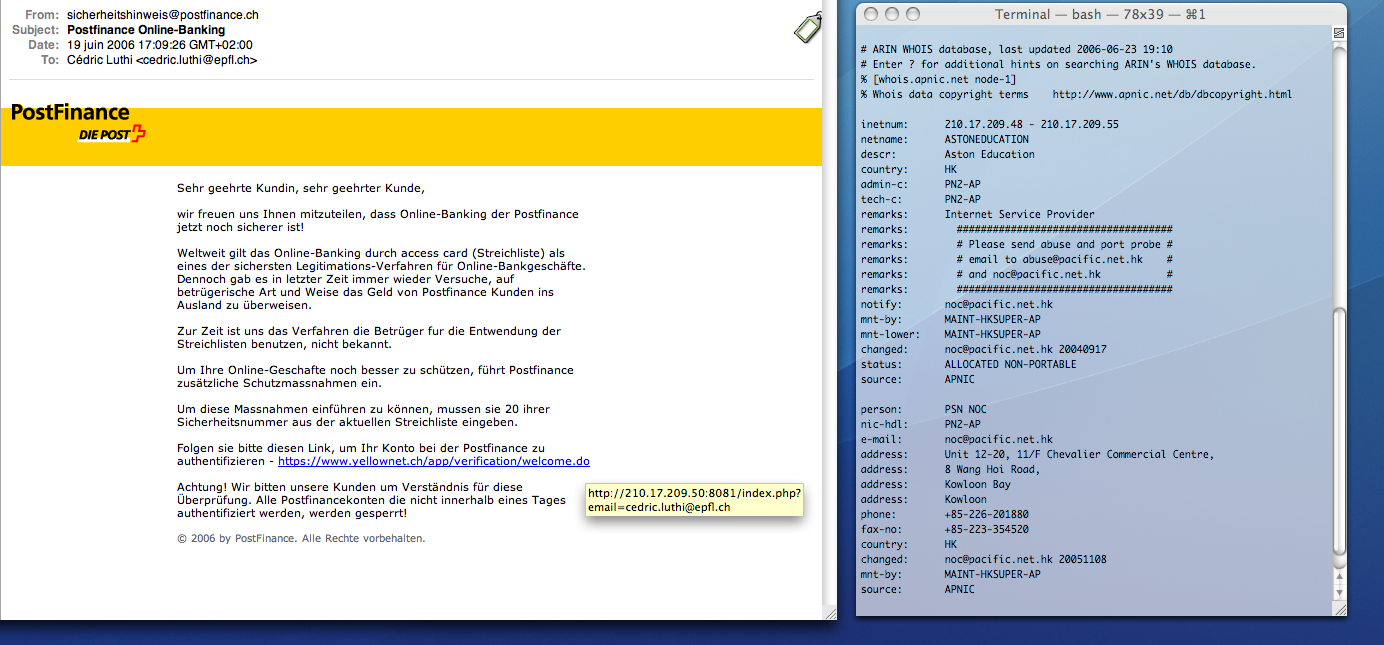
On ne le répétera jamais assez, votre banque ne vous enverra jamais d'e-mail vous demandant de vous authentifier dans le jour même sous peine d'avoir votre compte fermé!

Voici l'e-mail que je reçu aujourd'hui comme beaucoup d'autres:


Lorsque l'on passe le curseur sur l'URL, on constate vite la supercherie: l'URL n'est pas du tout la même que celle annoncée dans le corps de l'e-mail. Une petite vérification avec un whois nous confirme que ce n'est effectivement pas le site web de PostFinance.

La nouvelle sur PostFinance

mots clés: phishing, PostFinance

Sunday, June 18, 2006

Using GNU lightning on an Intel Mac

GNU lightning is a library that generates assembly language code at run-time. This is an useful tool for writing a Just-In-Time compiler.

While your jit compiled code will work on most systems, you will probably experience crash under Mac OS X with an EXC_BAD_INSTRUCTION exception on a movdqa %xmm0,32(%esp) instruction. The reason if this crash may seem obscure but is in fact simple: on Mac OS X, the stack must be 16-byte aligned at the point of function calls. This is documented in the Mac OS X ABI Function Call Guide.

So, how to fix this problem ? Align the stack manually by jit compiling special instructions before every function call depending on the number of parameters pushed ? This is quite tedious. A better solution is to use gcc's -mstackrealign switch.

Here is the documentation of this option:

-mstackrealign
Realign the stack at entry. On the Intel x86, the -mstackrealign option will generate an alternate prologue/epilogue that realigns
the runtime stack. This supports mixing legacy codes that keep a 4-byte aligned stack with modern codes that keep a 16-byte stack for SSE compatibility. The alternate prologue and epilogue are slower and bigger than the regular ones, and they require one dedicated register for the entire function. This also lowers the number of registers available if used in conjunction with the "regparm" attribute. Nested functions encountered while -mstackrealign is on will generate warnings, and they will not realign the stack when called.

Enjoy, your program is not crashing anymore. :-)

keywords: GNU lightning, Intel Mac, crash, EXC_BAD_INSTRUCTION, movdqa xmm0

Saturday, June 17, 2006

Relaunch your Cocoa application by itself

Here is a code snippet of a relaunch helper tool with instructions to use it.

keywords: self, restart, relaunch, cocoa, os x